The Korg wavestate Demystified
To understand the Korg wavestate, it’s a good idea to understand the evolution of sample-based synthesizer features in the Korg M1 and Wavestation.
Korg M1
In 1988 Korg released the M1 workstation, at a price of $2166, adjusted for inflation that would be approximately $6,135 today. It was one of the first “music workstation” keyboards released: providing a multitimbral synthesizer engine supporting layering and keyboard splits, combined with an eight-track sequencer, and onboard digital effects. It also featured drum sounds, allowing an entire song to be composed within one device.
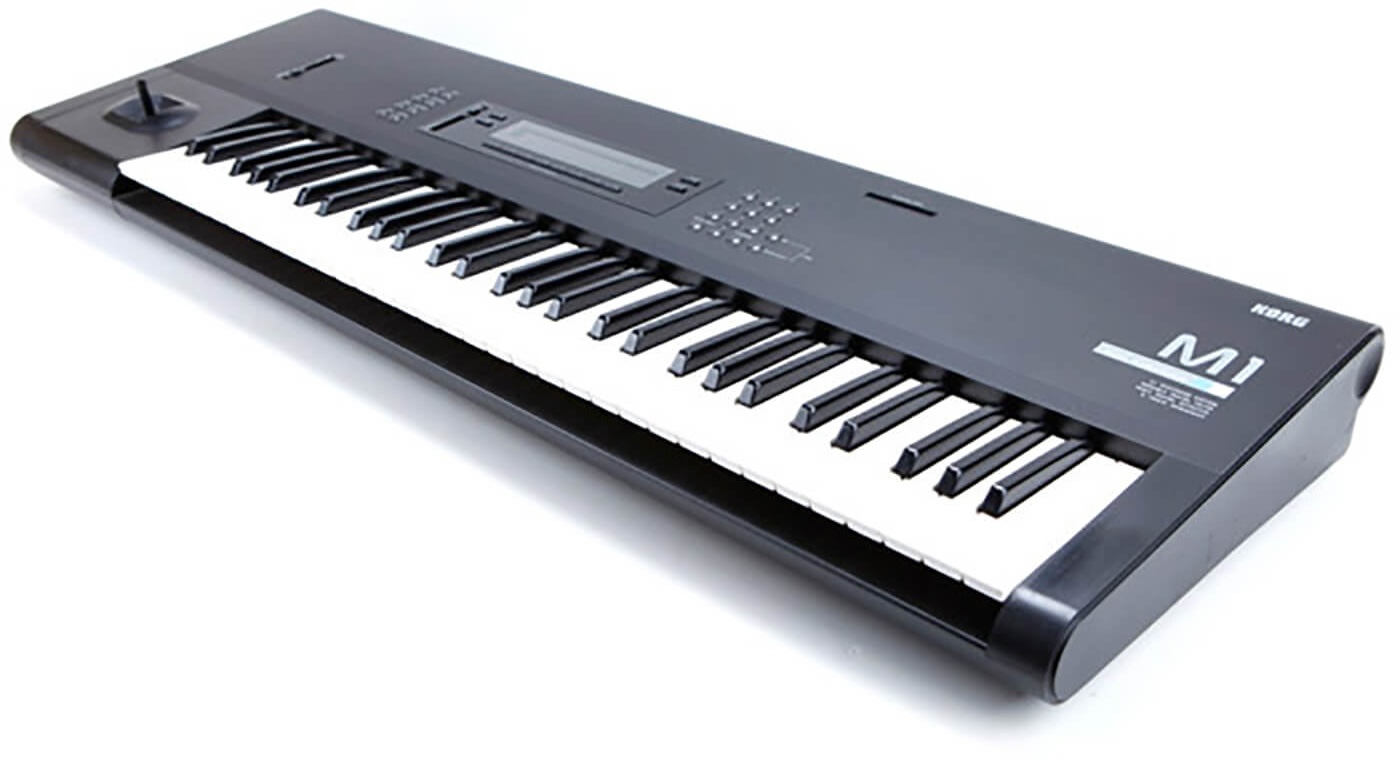
It featured 61 keys with velocity and aftertouch support, 100 instrument sounds and 44 drum sounds (4 MB of 16-bit samples). The joystick was used to manipulate pitch bend (horizontal) and modulation (vertical) at the same time.
It supported 2 multi-part modes:
- Sequencer Mode - Used with internal sequencer or an external MIDI sequencer to compose music with eight sequencer tracks, each assigned a Program
- Combination Mode - Designed for playing multiple parts live from the keyboard. Also supported 8 tracks / programs, but with support for layering or splitting sounds across the keyboard using zones, combined with velocity switching (playing one program or another depending on a configured lower/upper velocity zone).
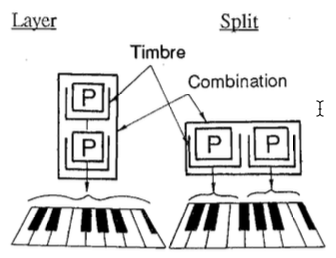
Each of the 8 “programs” supported in these modes could support one oscillator (Single), two oscillators (Double), or a set of drum sounds. Each oscillator includes its own synth engine (filter, amplifier, envelopes, LFO modulation).
8 programs, possibly supporting 2 oscillators each, comes to a total of 16 oscillators, which is the voice limit of the synth. Obviously, if one wanted 3 voice chords for a certain program, they would need to limit the number of programs being used in Sequencer or Combination mode.
In summary, the M1 was the introduction of a sample based synthesizer characteristically known for its ability to dynamically layer sounds across a keyboard, with pitch/filter/amp envelopes and other modulation settings (including effects) causing multiple independent movements in the timbre at the same time.
Korg Wavestation
The Korg Wavestation was released in 1990 at a price of approximately $2,195 ($5400 today).
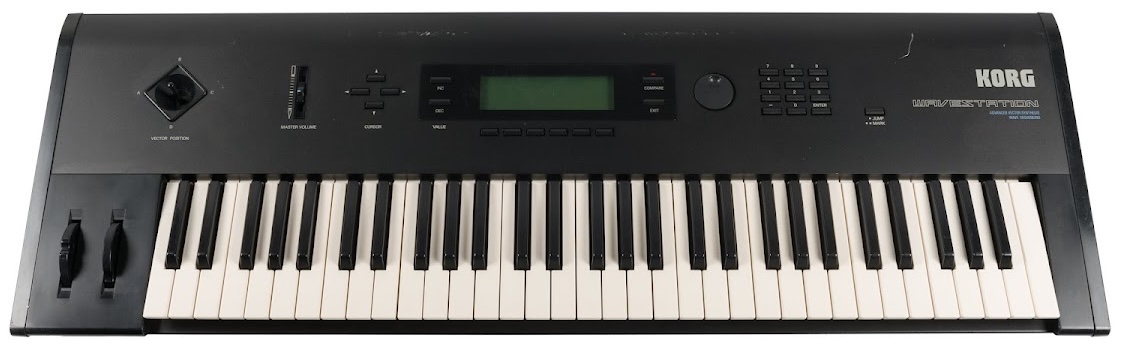
Instead of using the term “program” for a sound, the Wavestation used the term “patch” instead. Instead of featuring 1 or 2 oscillators per patch, the Wavestation featured the ability of having 1, 2, or 4 oscillators configured within a patch.
The Wavestation was aimed more at sound designers, performing keyboardists and studios using external MIDI sequencing, so it did not feature a built-in sequencer. It did still support playback of 8 patches at the same time.
Synth Engine
The predetermined modulation options of the M1 were expanded with a virtual modulation matrix in the Wavestation that allowed more flexible modulation capabilities.
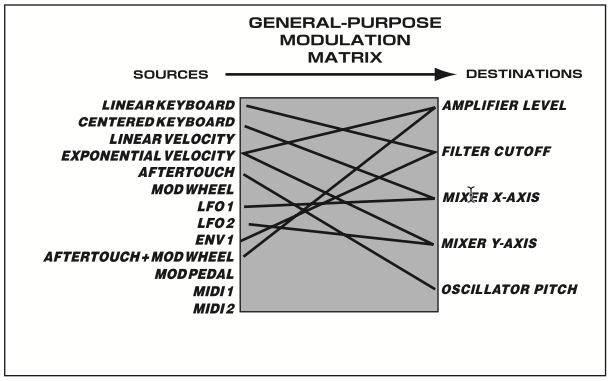
The M1 synthesizer engine had dedicated envelopes for pitch, filter, and amplifier. With the Wavestation, the Filter envelope was designated as a general purpose “Envelope 1” that could be assigned to the Filter, Pitch, Amp, or LFO1/LFO2 rate and modulation depth.
Dave Smith’s Influence
After Sequential Circuits ceased operations and its assets were acquired by Yamaha in 1987, several former engineers such as Dave Smith, John Bowen, Scott Peterson, and Stanley Jungleib joined Korg in 1989. The architecture of the Wavestation grew from the Prophet VS’s vector-synthesis ideas rather than directly from the M1 workstation design.
That helps explain why it feels less like “M1 Mark II” and more like an advanced descendant of the Prophet VS that happened to use Korg PCM and effects technology.
Vector Synthesis
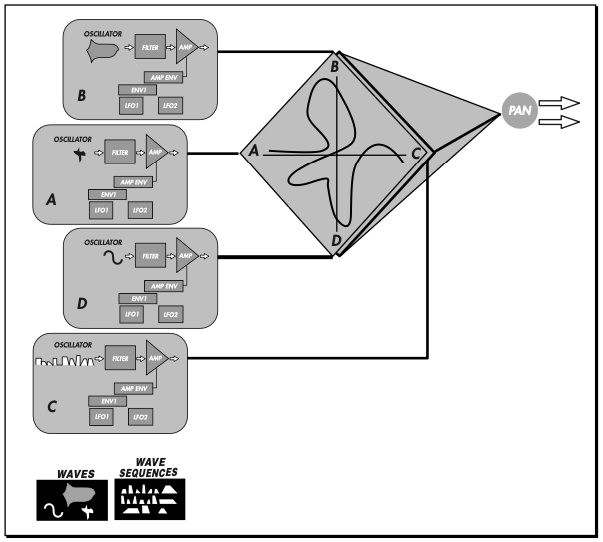
The joystick was repurposed for the purpose of vector synthesis (VS), controlling the mix / crossfading between the 4 oscillator parts within a patch rather than controlling pitch bend and optionally configured modulation (like a mod-wheel). In fact, it featured the vector joystick in addition to traditional pitch bend and mod-wheel.
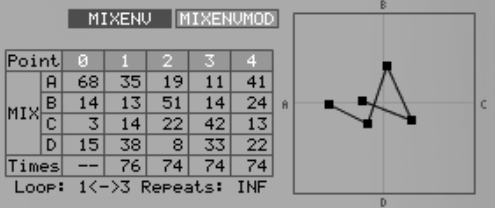
In addition to using the joystick you could program the automation of the vector joystick movement over time using a “mix envelope”, allowing for the relative balance of all 4 sound sources to travel around a programmable path, including the ability to loop the movement.
The MixEnvMod options additionally allow for modulation of the vector controls from various sources (aftertouch, mod-wheel, LFO1, LFO2, etc).
A demonstration of the vector synthesis features can be seen in this Wavestation plugin tutorial by Anthony Chisnall.
Wave Sequencing
Wave Sequencing was the larger conceptual change introduced by the Wavestation. On the M1 an oscillator had the ability to only play one sample sound for the life of a note. The Wavestation introduced the ability to configure multiple steps over time that change the sample sound source (PCM waveform), duration, pitch, fine-tuning, level, and crossfade time between each step. A wave sequence could support up to 255 steps.
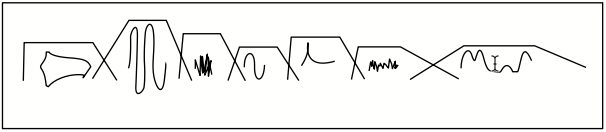 A wave sequence consisting of seven steps
The sequence could loop, play forward and backward, and be synchronized with an internal or external MIDI clock.
This feature made it possible for smooth timbral evolution over time when used with crossfade times, sounding like one continuous transforming texture… Or it could be like an arpeggiator, repeating a transposed rhythmic sequence consisting of different timbres, pitches, and levels.
Many synths feature a built-in arpeggiator, allowing you to hold a chord and have it step through the notes in certain patterns and synced to various timing (1/16th notes, dotted 1/8th notes, etc.), for for MIDI-synchronized live playback. Others include 8- or 16-step sequencers that let you program the intervals between the notes and play them back in the same manner, transposed by the key(s) you press.
The Wave Sequencing feature took that kind of functionality and moved it closer to being like a time-based programmable PCM oscillator whose identity changed over time.
This overlaps with one of the central goals of wavetable synthesis—creating timbres that evolve over time—but achieves it by sequencing discrete PCM waveforms rather than scanning continuously through a wavetable.
Layered Architecture
The Wavestation used the term “performance” instead of “combination” to describe the combination of 8 patches assigned across the keyboard, with velocity zones, transpose and tuning, level and pan, and shared effects routing configurations.
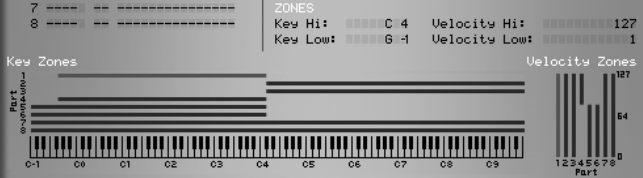
If you look at the intersection of all the abilities inherited from the M1 and added by the Wavestation, you have sound design possibilities that exceed what some are able to cognitively understand easily.
- Performance
- Up to 8 Parts, each containing a Patch
- Up to 4 oscillators per Patch
- Each oscillator can use a PCM waveform or Wave Sequence
- Each oscillator has its own filter, amplifier, envelopes, and LFOs
- Vector Mix automation between the oscillators
- Up to 4 oscillators per Patch
- 2 effects processors shared across the Performance
- Parts assigned across keyboard and velocity zones
- Limited by a maximum of 32 voices
- Up to 8 Parts, each containing a Patch
There are several nested systems that operate simultaneously. It is a lot to wrap your head around.
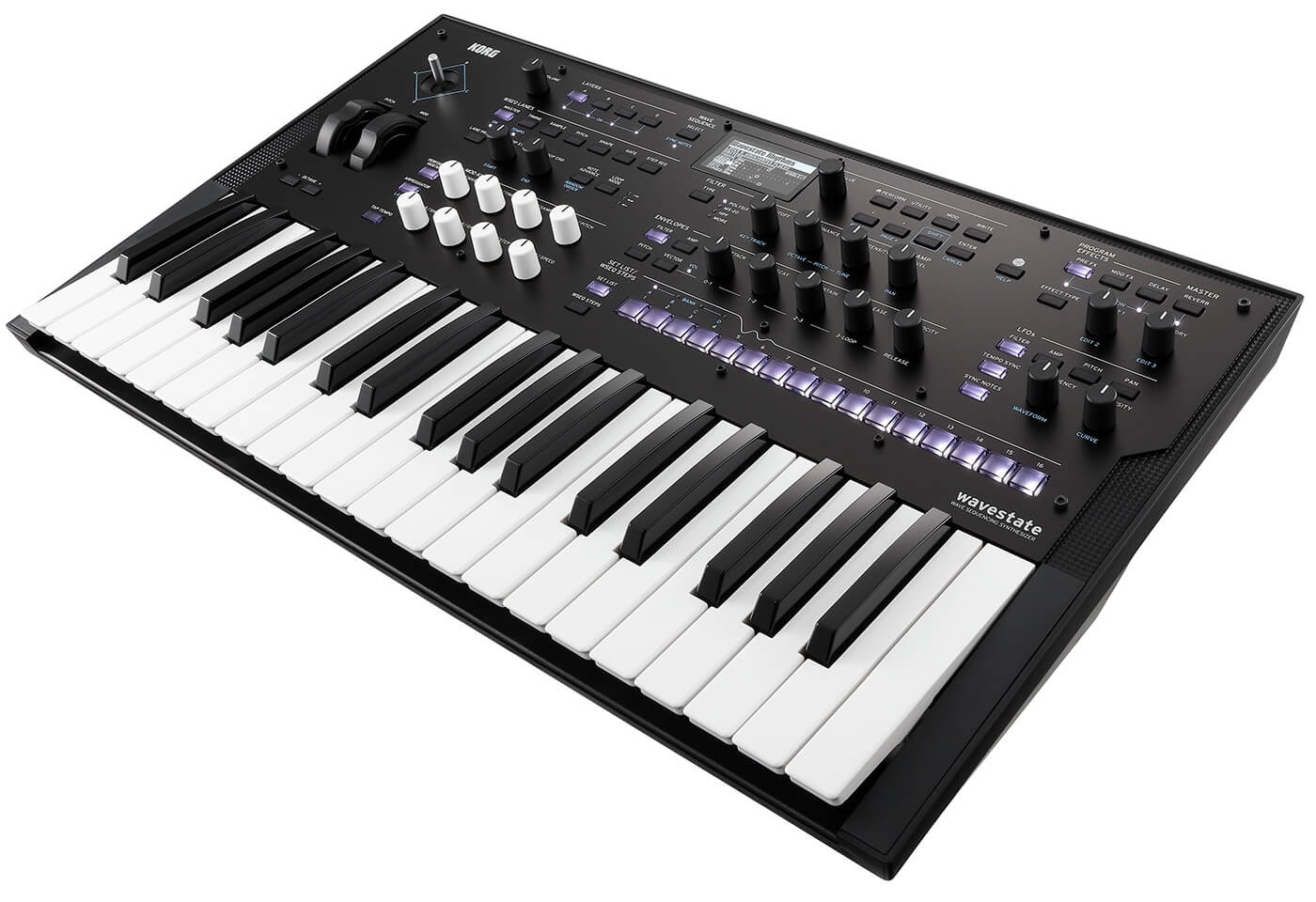
wavestate Engine
Now that you have an understanding of the M1 and Wavestation features and design, it’s easier to understand the Korg wavestate mk2.
The wavestate was introduced in 2020, reviving the dedicated Wavestation hardware lineage roughly 25 years after the original series was discontinued. The second version, wavestate mk2, was released in 2023.
| mk1 | mk2 | |
|---|---|---|
| Released | 2020 | 2023 |
| Voices of Polyphony | 64 | 96 |
Both versions support integration with wavestate Editor/Librarian software, as well as the wavestate Native plugin you can run in your DAW (Ableton Live, Cubase, etc.)
Programs
The wavestate has ditched the term “Patch” and adopted “Program” again. Each Program contains an oscillator based on either a multi-sample or Wave Sequence, followed by a Filter, Amplifier, Effects.
Where the Wavestation only had a non-resonant digital low-pass filter, the wavestate offers multiple types of filters (2 pole and 4 pole low-pass, high-pass, band-pass, band-reject, MS-20 low and high-pass, Polysix low-pass, and a multimode blendable Multi filter).
The wavestate features 3 LFOs, 2 modulation processors, and expands on the modulation abilities to make most parameters of the synth engine available as modulation destinations.
Layers
The wavestate still features a “Performance” with keyboard and velocity zones, however instead of 8 programs it is now reduced to 4 “Layers”.
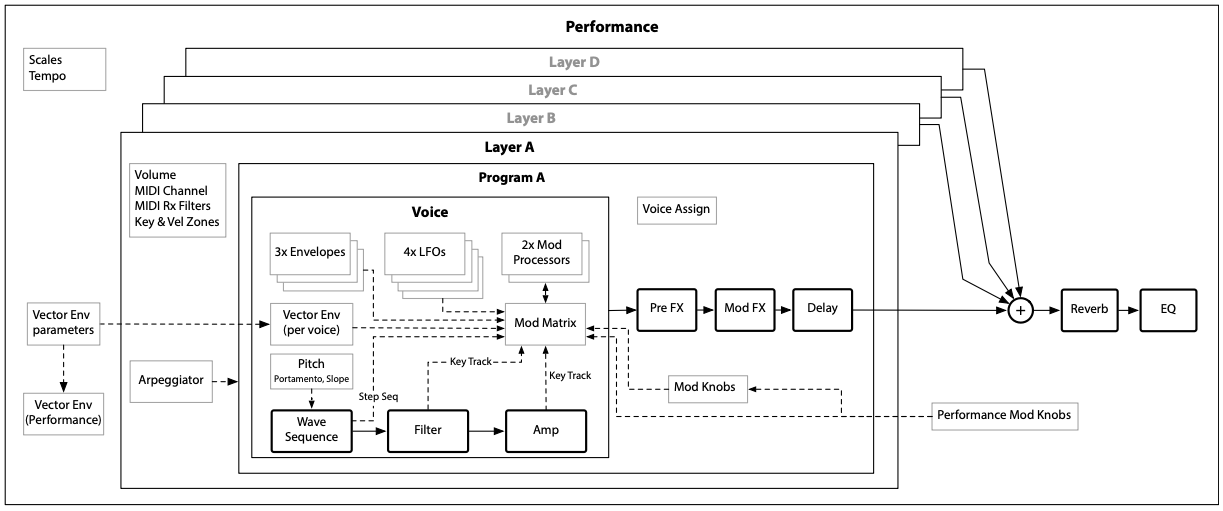
Additionally each layer only runs 1 oscillator/program, not 4. Each layer however does also include a traditional Arpeggiator feature.
| Wavestation | wavestate | |
|---|---|---|
| Parts/Layers per Performance | Up to 8 Parts | Up to 4 Layers |
| Sound assigned to each Part | 1 Patch | 1 Program |
| Oscillators per Patch or Program | Up to 4 | 1 |
This may seem like an odd trade-off, with the wavestate synths supporting 2-3 times (64-96 voices) the number of voices as the Wavestation (32 voices), but featuring fewer layers in a performance and only one program/oscillator per layer.
In the most demanding configurations, a Wavestation Performance could appear highly layered but leave very little practical polyphony. Eight active Parts using four-oscillator Patches could consume all 32 voices with a single played note.
At moments when all four Layers are active and each Wave Sequence is crossfading between two samples, a single played note may temporarily require eight voices. Long releases, sustained notes, and independent arpeggiators can increase voice use further.
This new design makes for a better balance with the available polyphonic voices supported.
Effects
The Wavestation relied on 2 effects shared across all 8 Patches/Programs. The wavestate introduces 3 effects assigned to each layer (Pre FX, Modulation FX, and Delay) in addition to Master Reverb and EQ effects that apply to the entire performance.
Vector Mixing
The original Wavestation mixed the 4 oscillators inside of one Patch. For the wavestate, the joystick and Vector envelope mix at a higher level - affecting the 4 Layers at the Performance, rather than 4 oscillators within each program/patch. The vector system can also be used as a modulation source rather than being limited only to crossfading.
Wave Sequencing 2.0
The biggest difference in design from the Wavestation in the wavestate is a newer Wave Sequencing 2.0 engine.
The original Wave Sequencing supported by the Wavestation bundled together the following across up to 255 steps:
- Sample
- Duration
- Pitch
- Level
- Crossfade
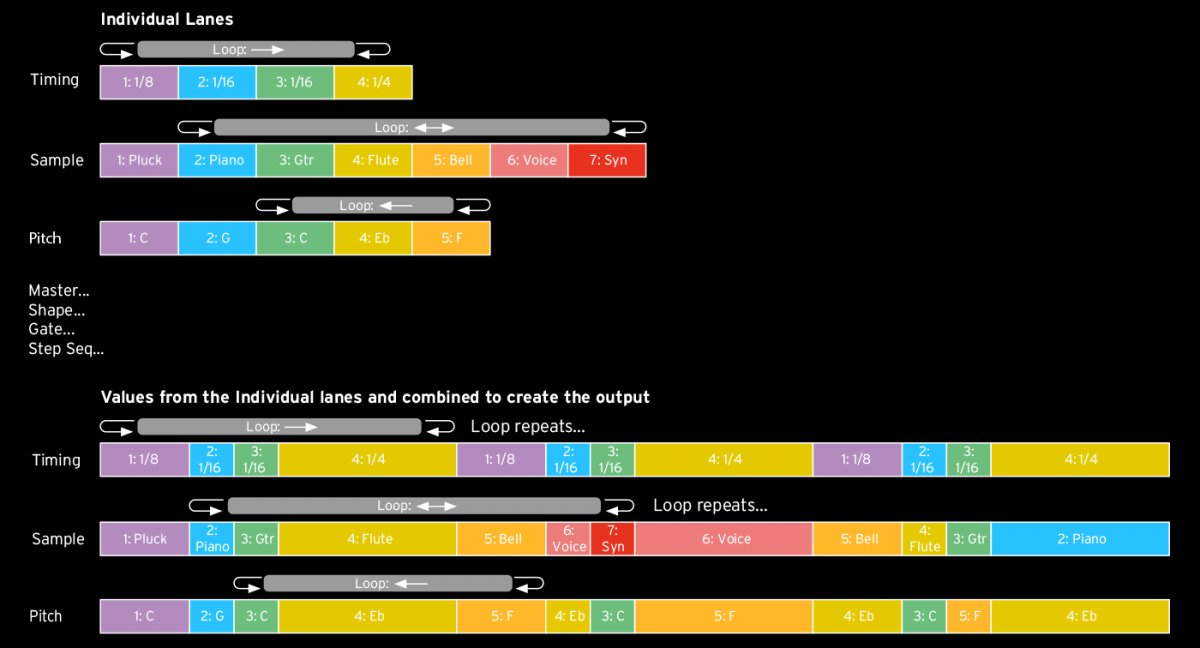
Wave Sequencing 2.0 separates these into independent lanes that support up to 64 steps each (16 steps divided into banks A-D).
| Lane | What it controls | Think of it as |
|---|---|---|
| Timing | How long each step lasts | Rhythm |
| Sample | Which multisample plays | Instrument/sample selection |
| Pitch | Pitch offset for that step | Melody/transposition |
| Shape | The contour applied across the step | Per-step envelope shape |
| Gate | How long the sound remains active | Note length/articulation |
| Step Sequence | An arbitrary modulation value | Automation/modulation sequencer |
Each lane can have its own number of steps, start and end position, loop start and end, and playback behavior.
The wavestate can produce a much longer evolving composite pattern from several short asynchronous lanes.
The wavestate also adds:
- step probability
- randomized step order
- modulatable lane start, end and loop points
- per-note lane variation
- independent lane lengths
- modulation of individual step parameters
A step can have a 40% chance of playing, for example. The Sample Lane might randomize while the Pitch Lane remains ordered. Because Wave Sequences run independently for each voice, different notes in a chord can follow different lane positions and probability outcomes.
This moves the wavestate toward:
- generative sequencing
- polymetric and asynchronous sequencing
- modular-style modulation
- probability-based composition
The Wavestation was an evolving sample sequencer. The wavestate can behave more like an algorithmic sound-generation system.
For a practical presentation of this, see Mastering Wave Sequencing 2.0 by Ian Dixon.
Conclusion
The Korg wavestate can make a poor first impression if it is judged primarily by its most dramatic presets. Some Performances emphasize obvious sample switching, dense layering, exaggerated movement, or sequencing that borders on novelty. Those sounds demonstrate what Wave Sequencing 2.0 is capable of, but they can also make the instrument seem more gimmicky than it actually is.
That impression is incomplete. The factory library also contains many Performances that use the same architecture with considerably more restraint. Presets such as Iceland Piano Pad, Dark Sonata Split, Subtle Thoughts, Circular Breathing Hold, Floating Mellow, The Traveler, Om-Manji Split, and Magic Bellz demonstrate that Wave Sequencing does not need to call attention to itself. The movement can be subtle, musical, and integrated into the character of the sound rather than presented as an obvious sequencing effect.
This leads to a more useful way of understanding what the wavestate is designed to do.
The “sequencing” in Wave Sequencing should be taken seriously. Many synthesizers include an arpeggiator or a simple eight- or sixteen-step sequencer that can synchronize to the instrument’s internal tempo, a DAW, a drum machine, or some other MIDI clock source. A musician loads a patch, holds one or more notes, and the synthesizer generates some kind of synchronized musical behavior.
The wavestate develops this idea much further.
Instead of treating sequencing as an optional feature added on top of an otherwise conventional synthesizer architecture, Wave Sequencing integrates sequencing into the construction of the Program itself. Timing, sample selection, pitch, gate length, shape, and modulation can each develop according to their own sequences. Those sequences can interact while remaining synchronized to the same musical tempo.
This does not mean that a wavestate Program must sound obviously rhythmic.
A Wave Sequence might produce clearly articulated sixteenth-note pulses, repeated melodic figures, percussion patterns, or other unmistakably sequenced material. But it might just as easily produce a slowly evolving pad whose internal changes occur over quarter notes, half notes, measures, or longer musical divisions. Crossfades can make those transitions so smooth that the listener barely perceives a sequence at all.
In both cases, the underlying concept is the same.
The Performance has behavior that unfolds through musical time.
Synchronizing the wavestate to a DAW or external MIDI clock makes this especially clear. Even when the motion is subtle, the evolution of a sound can remain related to the tempo of the composition. A timbral transition can happen every measure. A sample cycle can repeat every four bars. A modulation pattern can slowly move through a different number of steps while remaining synchronized to the same clock. An atmospheric sound can therefore breathe with the composition rather than evolving according to an arbitrary amount of elapsed time.
The distinction between an obvious rhythmic sequence and a subtle evolving texture is therefore not a distinction between correct and incorrect uses of Wave Sequencing. It is primarily a matter of programming, genre, and taste.
A techno producer might use short steps, strong gates, percussion samples, and conspicuous rhythmic modulation. An ambient musician might use long durations and smooth crossfades to produce movement that is almost subliminal. A soundtrack designer might combine pitched material with impacts, breaths, environmental sounds, and slowly changing modulation. All three are using the same underlying architecture.
This also clarifies the importance of non-chromatic samples.
Traditional sample-based instruments tend to emphasize chromatic material such as pianos, strings, synth waves, bells, guitars, and other sounds intended to follow the keyboard. The wavestate makes non-chromatic material equally useful. Rumbles, impacts, breaths, scrapes, percussion, mechanical noises, environmental recordings, and short textural events can become part of the rhythmic and timbral behavior of a Program.
These sounds do not need to function merely as effects placed around the “real” instrument. When introduced at appropriate moments within a Wave Sequence, they can contribute articulation, pulse, weight, movement, tension, and atmosphere. They become part of the identity of the playable sound.
This is where the wavestate begins to occupy a space somewhere between synthesis, sequencing, and instrument design.
A Performance can contain rhythm, pitch movement, evolving texture, atmosphere, and partial musical structure while still remaining something that is played from a keyboard. The programming establishes a set of musical relationships, but the player still determines the notes, chords, voicings, register, velocity, and performance gestures used to explore those relationships.
The result is not necessarily a miniature composition that plays itself. It is better understood as a programmable musical behavior.
That behavior can then be transposed, revoiced, layered, altered, and revisited.
This is also where the wavestate differs from simply recreating the same result in a DAW.
Cubase can reproduce nearly anything the wavestate can generate, often with considerably greater precision. Multiple MIDI tracks, audio regions, automation lanes, samplers, modulators, effects, and routing can duplicate extremely complex Wave Sequences. For a fixed arrangement, the DAW may even be the easier tool.
But the products of those two workflows are different.
A DAW arrangement normally produces a particular result.
A wavestate Performance produces a system capable of generating a family of related results.
Once the Performance has been programmed, its relationships become available under the player’s hands. The rhythm can remain intact while the harmony changes. Some elements can transpose while others remain fixed. Different lane lengths can continue interacting while new notes and chords are introduced. Probability can create controlled variation. Modulation can alter the sound without destroying the identity of the Performance.
The programming effort has therefore created something closer to a new instrument than to a finished sequence.
A useful comparison can be made with specialized audio plugins. Many plugins combine processes that could technically be recreated with stock effects in a DAW. A particular sound might be assembled from EQ, compression, saturation, modulation, delay, and reverb. The value of the specialized tool is not necessarily that the result would otherwise be impossible. Its value is that it packages a useful process in a form that is accessible, repeatable, and easy to manipulate as a unified system.
The wavestate provides similar value for time-dependent sound design.
Its independent sequencing lanes, polymetric cycles, probability, sample sequencing, pitch behavior, modulation, effects, and four-layer Performances make it possible to construct complex musical behaviors and store them as playable objects.
This also explains why different sound libraries can produce dramatically different impressions of the instrument. Wave Sequencing 2.0 does not impose an aesthetic. It provides a framework.
One sound designer may use that framework to create aggressive rhythmic demonstrations. Another may produce evolving cinematic textures. Another may build restrained pads, keyboard splits, acoustic hybrids, or subtle rhythmic instruments whose sequencing is barely apparent.
The wavestate itself is largely indifferent to those choices.
The player decides how obvious the sequencing should be.
For me, this has become the most useful way to conceptualize the instrument. The wavestate takes something that is commonly treated as an accessory on other synthesizers—the tempo-synchronized arpeggiator or step sequencer—and makes that idea fundamental to the sound architecture. It separates different properties of a sequence into independent lanes and allows them to interact over musical time.
Wave Sequencing can therefore be dramatic or nearly invisible. It can generate a groove, animate a pad, introduce occasional acoustic or environmental events, create melodic movement, or simply cause a sound to evolve in a way that remains synchronized with the composition.
The important feature is not how noticeable the sequence is.
The important feature is that the sound has programmable behavior in time.
Once that distinction becomes clear, the wavestate stops looking like a synthesizer built around a collection of sequencing tricks. It becomes easier to understand it as an instrument for designing sounds that do something while they are being played.
If you happen to purchase the Wavestate Native plugin, or an actual wavestate synthesizer, I recommend trying out a sound library such as Cinematic Pulses or Space Western.