Korg Wavestate Insights
I’m exploring the capabilities of the Korg wavestate mkII, so that I can explain to a friend how to use it. These are some of my notes that might help fill in the gaps for others, or at least make them more aware of its nature if they’re thinking of buying one.
Forms
There are several forms of wavestate you can choose from.
| Release | Voices | Keys | Velocity | Aftertouch | Description | |
|---|---|---|---|---|---|---|
| wavestate mkI | 2020 | 64 | 37 | Yes | No | |
| wavestate native | 2022 | n/a | n/a | n/a | n/a | plugin (VST, AAX, standalone) |
| wavestate mkII | 2023 | 96 | 37 | Yes | No | |
| wavestate SE | 2023 | 120 | 61 | Yes | Yes | |
| wavestate SE Platinum | 2023 | 120 | 61 | Yes | Yes | Limited edition; Metal top and side panels |
| wavestate module | 2024 | 120 | n/a | n/a | n/a | Desktop / Rack module |
Managing Data
Write Protection
For new users of the wavestate, it’s important to know that you cannot overwrite the factory data.
Korgs Editor/Librarian manual states that factory data—including Performances, Programs, Wave Sequences, Wave Sequence Lane presets, Effects presets, and other shipped objects—cannot have their original versions changed or deleted. Even metadata such as the name, author, collection, and categories is locked.
The wavestate uses a database to keep sounds organized. Internally, sounds are identified not by their names, but rather by a unique tag attached to the file, called a UUID (“Universally Unique Identifier”). This means that even if a sound’s name has been changed, the system still knows it’s the same sound. When you write a sound from the wavestate front panel, “Overwrite” keeps the UUID the same, and “Save As New” creates a new UUID. When you import data, the UUIDs in the sounds to be imported are compared with those already in the database
User Samples
I was surprised to learn that the wavestate can hold only one user sample bank. You therefore have to maintain that bank on your Mac or PC, merge any new sample sets into it, and then upload the updated bank with Korg Sample Builder. This appears to be a limitation of the original hardware design.
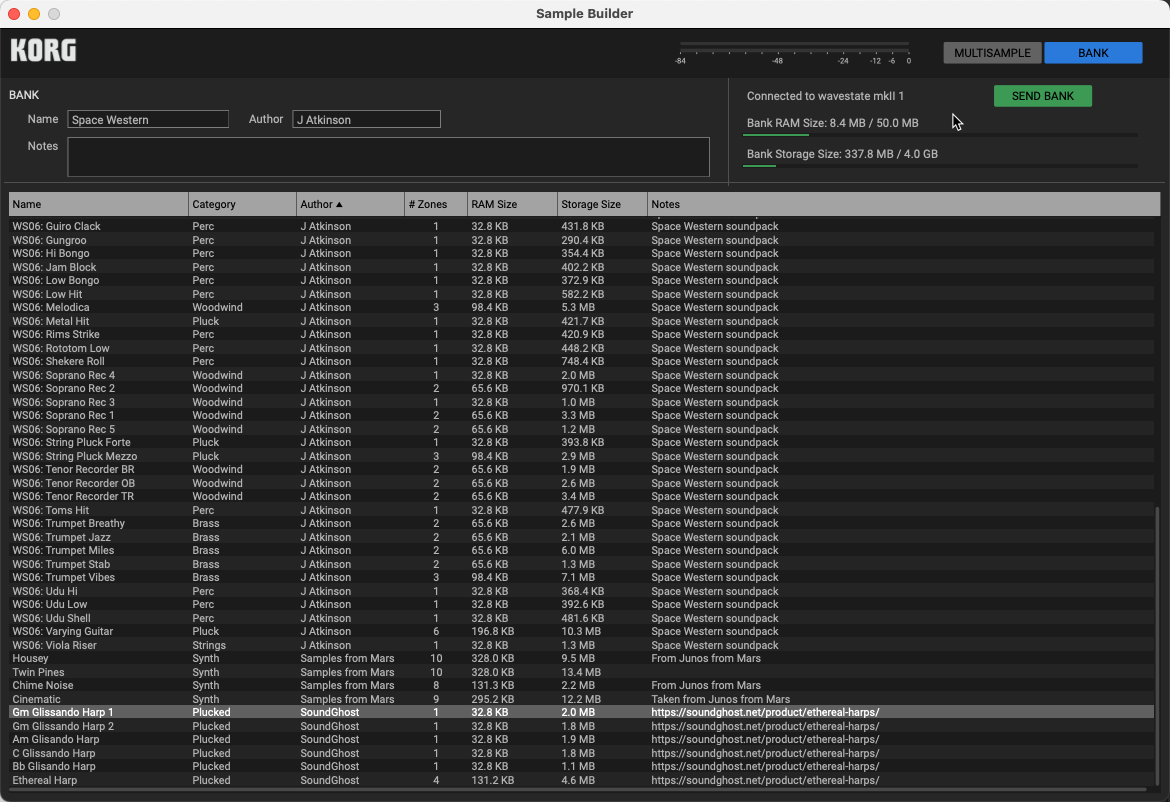
Programs reference multisamples by UUID, so imported sounds will work as long as the expected multisamples are present in the user bank. If a Program or Performance is silent because a sample is missing, adding that multisample to your bank and re-uploading it should restore the sound.
For third-party libraries that include samples, the workflow is therefore split between two applications: use Sample Builder to merge and upload the samples, then use Editor/Librarian to import the supplied Performances, Programs, Wave Sequences, or other preset objects. Once both parts are installed, the library should work normally from its Collection.
Hidden Parameters
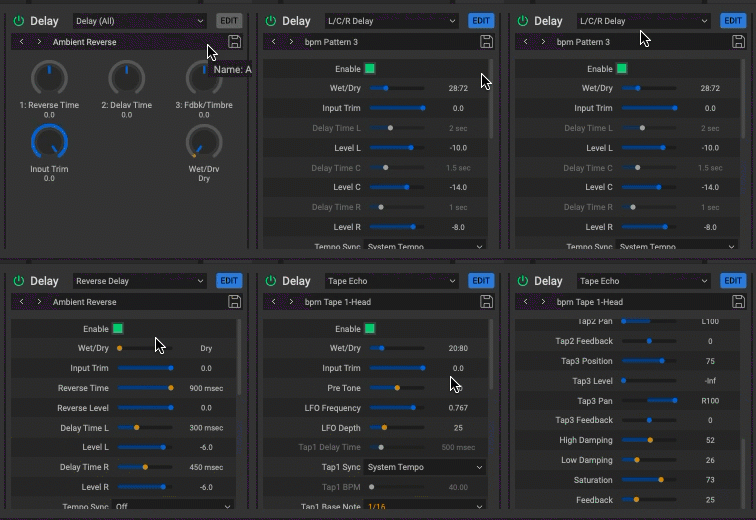
Not all the parameters are accessible from the hardware. The Effects section has many more parameters available from the Editor/Librarian software.
For example, the “L/C/R Delay” effect that can be enabled for each Program loaded into the 4 layers of a Performance has additional parameters for the Note timing (1/4th, 1/4th dotted, 1/8th, 1/16th), Repeat times, and Levels of each delayed note (L, C, and R).
Favorite Stock Performances
Set List: Taste of Wavestate
| Bank | Part | Performance Name |
|---|---|---|
| 1 | 2 | Iceland Piano Pad |
| 1 | 4 | Dark Sonata Split |
| 1 | 11 | Subtle Thoughts |
| 2 | 3 | Circular Breathing Hold |
| 2 | 9 | Floating Mellow |
| 3 | 13 | The Traveler |
| 3 | 16 | Om-Manji Split |
| 4 | 3 | Magic Bellz |
Architecture
Set List
- 64 Slots
- Bank A: 1–16
- Bank B: 1–16
- Bank C: 1–16
- Bank D: 1–16
- Each slot points to a Performance.
Performance
- 4 Layers
- Layer A
- Layer B
- Layer C
- Layer D
- Performance Vector Envelope
- Automates movement through the X/Y vector space.
- Can control the relative contribution of Layers A–D.
- 8 Performance Mod Knobs
- Can control parameters across one or more Layers.
- Tempo
- Scale
- Performance Hold
- Master Effects
- Master Reverb
- Master EQ
Layer
- Program
- Layer Volume
- Key Zone
- Velocity Zone
- MIDI Channel
- MIDI Receive Filters
- Voice Assign / Voice Settings
- Arpeggiator
The Layer determines how its Program participates in the larger Performance. For example, the same Program can be used in different Performances with different keyboard zones, velocity zones, volumes, and arpeggiator settings.
Program
- Sound Source
- Wave Sequence
- or a single Multisample
- Pitch
- Pitch Envelope
- Pitch LFO
- Portamento
- Slope
- Filter
- Filter Envelope
- Filter LFO
- Filter Key Track
- Amp
- Amp Envelope
- Amp LFO
- Amp Key Track
- Pan
- Pan LFO
- Per-voice Vector Envelope
- Points 0, 1, 2, 3, and Release
- X/Y position for each point
- Derived Layer A–D vector levels
- Time or Tempo mode
- Looping options
- 2 Mod Processors
- Modulation Matrix
- 8 Program Mod Knobs
- Effects
- Pre FX
- Mod FX
- Delay
Wave Sequence
A Program’s sound source can use a Wave Sequence instead of a single Multisample.
- Master Lane
- Controls properties of the Wave Sequence as a whole.
- Timing Lane
- Controls when each Wave Sequence event advances.
- Sample Lane
- Selects the Multisample used at each step.
- Includes per-step Trim for balancing sample level.
- Pitch Lane
- Controls pitch changes independently of Sample selection.
- Shape Lane
- Provides a changing contour over the duration of a step.
- Gate Lane
- Controls the duration or articulation of each event relative to its Timing step.
- Step Sequencer Lane
- Generates a programmable modulation value for each step.
- Acts as a modulation source.
- One Step Seq value can be routed to multiple modulation destinations with different modulation amounts.
- Each lane contains its own sequence of steps and can have independent loop lengths and behavior.
Envelopes
Each Program includes three conventional envelopes:
- Pitch Envelope
- Filter Envelope
- Amp Envelope
Their names indicate their conventional assignments, but they are also general modulation sources and can be routed to additional compatible parameters.
The Per-voice Vector Envelope is separate from these three envelopes. Rather than functioning as a conventional ADSR, it automates movement through a series of vector positions.
LFOs
Each Program provides four LFOs:
- Pitch LFO
- Filter LFO
- Amp LFO
- Pan LFO
Like the envelopes, these can also serve as general modulation sources rather than being restricted exclusively to their namesake sections.
Modulation
The Program’s modulation system connects modulation sources to modulation destinations.
Automatic or programmed modulation sources include:
- Pitch, Filter, and Amp Envelopes
- Pitch, Filter, Amp, and Pan LFOs
- Per-voice Vector Envelope
- Step Sequencer Lane
- Step Pulse
- Filter and Amp Key Tracking
- Mod Processors
Performance and expression sources include:
- Velocity
- Release Velocity
- Aftertouch
- Note Number
- Mod Wheel
- Pitch Wheel
- Vector Joystick
- Program Mod Knobs
- Performance Mod Knobs
- MIDI CC values
- Gate and note-trigger states
A single modulation source can generally be routed to multiple compatible destinations with independent modulation amounts.
Effects
Each Program has three effects:
- Pre FX
- Mod FX
- Delay
The Performance then provides:
- Master Reverb
- Master EQ
The hardware exposes effect type, presets, Wet/Dry, and three Edit macro controls. The Editor/Librarian provides access to the complete internal parameter set for each effect algorithm, including parameters that cannot be directly edited from the wavestate hardware.
Presets
The following objects can be stored to the database and re-used. This makes experimenting and assembling Performances and Programs much more efficient.
- Set List
- Performance
- Program
- Wave Sequence
- Wave Sequence Lane Preset
- Effects Preset
- Scale
Third party sound sets usually provide performances, programs, and samples for the most part. The factory set of wave sequence lane presets is very rich however.
| Lane | Factory presets |
|---|---|
| Master | 34 |
| Timing | 536 |
| Sample | 957 |
| Pitch | 328 |
| Shape | 315 |
| Gate | 172 |
| Step Seq | 186 |
| Total | 2,528 |
Wave Sequencing 2.0
In the other post I made exploring the Korg wavestate Lineage, I was trying to wrap my mind around the architecture of the wavestate so I could best articulate what kind of capability it was designed to provide, taking the original Wavestation Wave Sequencing engine into consideration.
It wasn’t until I connected the wavestate to my drum machine via MIDI clock that the concept really clicked for me. Many of the Performances I explored were configured to use tempo-synchronized Timing Lane values. Once synchronized, the rhythm and movement of the sound—whether subtle or obvious—locked naturally to the beat coming from the drum machine or my DAW.
Many synthesizers, such as the Moog Subsequent 37, and MIDI controllers, such as the Arturia KeyStep, provide an arpeggiator or a limited step sequencer. These allow a musician to create patterns that run in synchronization with the tempo of a larger performance.
Wave Sequencing belongs to the same general family of ideas, but takes the concept considerably further. The original Wavestation allowed each step of a Wave Sequence to specify properties such as its sample, duration, pitch, level, and crossfade behavior. The wavestate’s Wave Sequencing 2.0 expands on that idea by separating timing, sample selection, pitch, gate, shape, and modulation into independent sequencing lanes.
This makes sequencing less like an optional feature placed on top of the synthesizer and more like an integral part of the Program’s sound-generation architecture. A Wave Sequence can produce an obvious rhythmic pattern, but it can just as easily create subtle tempo-synchronized movement inside a pad, texture, or evolving acoustic sound.
| Wavestation | wavestate |
|---|---|
| Duration | Timing Lane → Duration |
| Crossfade time | Timing Lane → Xfade |
| Level | Sample Lane → Trim |
| Coarse tuning | Pitch Lane → Transpose |
| Fine tuning | Pitch Lane → Tune |
| Modulation Index | Step Sequencer Lane is the closest generalized equivalent |
| Shape Lane → per-step contour/shape | |
| Gate Lane → per-step gate length/articulation | |
| Step Sequencer Lane → per-step modulation value | |
| Per-step probability/variation controls |