Fixing Cubase MediaBay Problems After Moving Files to Another Drive
Intro
I recently upgraded my music-production storage by moving Cubase projects,
samples, and other content from an external hard disk (StudioHDD) to a faster
external SSD (StudioSSD). The HDD had originally been my main external drive
for music production. After the migration, I repurposed it for installers,
archives, and backups, while the SSD became my active working drive.
The move was supposed to improve performance in Cubase. Instead, I started
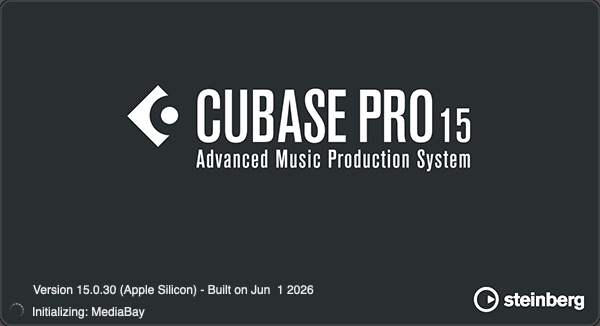
encountering a recurring error when launching Cubase Pro 15. The splash screen
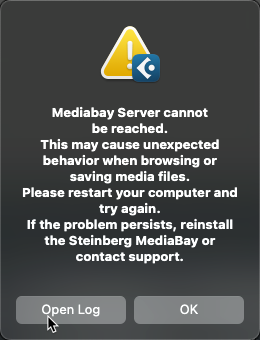
would reach Initializing MediaBay, then report that Cubase couldn’t
communicate with the Steinberg MediaBay Server. MediaBay’s File Browser also
showed duplicate entries for StudioSSD, and some folders wouldn’t expand
properly.
Reinstalling Cubase didn’t help. Resetting the local MediaBay database helped
briefly, but the error returned. Eventually I discovered an old volume
database on StudioHDD, still present after much of the indexed content had
been moved to StudioSSD. Taking that database out of service fixed the startup
error and restored normal folder browsing.
The lesson is simple: when you move a lot of indexed files between drives outside Cubase, don’t assume MediaBay has automatically reconciled its existing databases with the new locations. A volume database may need to be rebuilt.
Quick Summary
- I moved my active Cubase projects and music content from a mechanical HDD to an SSD.
- Cubase Pro 15 subsequently encountered MediaBay Server communication timeouts during startup.
- MediaBay displayed duplicate drive entries and sometimes wouldn’t expand folders.
- Reinstalling Cubase didn’t help; resetting the local database helped only temporarily.
- Logs showed that the MediaBay client stopped trying to connect about two seconds before the server opened its communication endpoint.
- The server had opened a 271 MB volume database on the old HDD during its unusually long initialization.
- Renaming that HDD database fixed the errors in subsequent tests without deleting any music files.
Understanding MediaBay Volume Databases
MediaBay indexes samples, loops, presets, and other content so that Cubase can find and browse them. It maintains a local database in the user’s preferences directory:
~/Library/Preferences/Steinberg MediaBay Server/mediabay3.db
It can also maintain volume databases on individual drives. On macOS, a volume database is stored at this path on the corresponding volume:
/Volumes/<VolumeName>/.steinberg/databases/mediabay3.db
For example, the database on my old working drive was:
/Volumes/StudioHDD/.steinberg/databases/mediabay3.db
The .steinberg directory is hidden because its name begins with a period. A
drive doesn’t necessarily have a volume database; in my case, StudioSSD had no
.steinberg/databases directory at all. That is not inherently an error, since
MediaBay can also use its local database.
The important distinction is that moving the files does not automatically move or discard the old drive’s volume database. MediaBay may eventually update references during scanning, but in my case the old database remained and apparently caused trouble after the migration. I didn’t inspect individual SQLite records, so I can’t say precisely which references or metadata were stale.
Symptoms After the HDD-to-SSD Migration
The most visible symptom was the communication error during Initializing MediaBay. Sometimes Cubase opened normally on the second or third attempt, especially after MediaBay had already initialized. Other times the error returned.
The MediaBay File Browser was also suspicious. It showed multiple entries for
StudioSSD and wouldn’t reliably expand subfolders. When I right-clicked
StudioHDD, Cubase offered Create Volume Database, even though a
mediabay3.db file already existed on that drive.
I also suspected that the MediaBay Server’s slow initialization might have been contributing to MIDI or audio latency I noticed while working with an external synthesizer. I haven’t demonstrated a causal connection, though. MIDI and audio latency can have many unrelated causes, and the logs only establish a startup communication delay. I mention the observation because it was part of the broader set of performance problems I was trying to solve.
Why Resetting Cubase Wasn’t Enough
I initially reinstalled Cubase Pro 15, but the problem persisted. This makes sense in hindsight: reinstalling Cubase doesn’t necessarily replace user-created MediaBay databases on internal and external storage.
Next, with Cubase closed, I renamed the local MediaBay preferences directory:
mv "$HOME/Library/Preferences/Steinberg MediaBay Server" \
   "$HOME/Library/Preferences/Steinberg MediaBay Server.backup"
On the next launch, MediaBay generated new preference files and a new local database. The previous local database was approximately 420 MB, while the newly created file initially measured just a few kilobytes.
A couple of subsequent launches were much faster and didn’t show the error, but
the improvement didn’t last. I had rebuilt the local database while leaving the
separate volume database on StudioHDD untouched.
That was the missing piece.
What the MediaBay Logs Revealed
When Cubase displays the communication error, its dialog includes an Open
Log button. This opens a log directory containing Clients and Server
folders. I compared logs from the same failed launch, both reporting MediaBay
version 1.4.10.19.
The client attempted to connect and repeatedly timed out:
01:57:06.457 : nanomsg - connectEndpoint (...)
01:57:07.459 : Client::initialize: timeout, retries 1
01:57:09.460 : Client::initialize: timeout, retries 2
01:57:12.462 : Client::initialize: timeout, retries 3
01:57:16.464 : Client::initialize: timeout, retries 4
01:57:21.466 : Client::initialize: timeout, retries 5
01:57:27.468 : Client::initialize: timeout, retries 6
01:57:34.470 : Client::initialize: timeout, retries 7
01:57:34.484 : nanomsg - shutdownEndpoint (...)
The server log showed what had happened on its side:
01:57:08.849 : MediaBayState::nextState [StateInitialized -> BackendSetup]
01:57:08.849 : MediaDataBase::openDatabase: /Users/jason/Library/Preferences/Steinberg MediaBay Server/mediabay3.db
01:57:08.874 : MediaDataBase::openDatabase: /Volumes/StudioHDD/.steinberg/databases/mediabay3.db
01:57:09.600 : Migrate path info:0
01:57:36.660 : MediaBayState::BackendSetup::onBackendSetupDone
01:57:36.665 : nanomsg - bindEndpoint (...)
01:57:37.051 : MediaBayState::nextState [FactorySetup -> UserRuntime]
01:57:37.051 : MediaBackend::initialize: done.
The key detail was the timing. The client abandoned its connection at 01:57:34, while the server didn’t open its communication endpoint until 01:57:36, roughly two seconds later.
There was also an unexplained delay of roughly 27 seconds between the path-migration message and completion of backend setup. The logs don’t tell us exactly what the server was doing throughout that interval, but they do show that it had opened the old HDD’s volume database before the delay.
So the error didn’t necessarily mean the MediaBay Server had crashed. In this instance, it was becoming ready too late for the client to connect.
Finding and Rebuilding the Old Volume Database
I inspected the database directory on the HDD:
ls -lah "/Volumes/StudioHDD/.steinberg/databases/"
It contained a single mediabay3.db file of approximately 271 MB. In
contrast, the equivalent directory didn’t exist on StudioSSD.
To let MediaBay start without relying on the old index, I first quit Cubase and ensured the MediaBay Server was no longer running. Then I renamed the HDD database rather than deleting it:
mv "/Volumes/StudioHDD/.steinberg/databases/mediabay3.db" \
   "/Volumes/StudioHDD/.steinberg/databases/mediabay3.db.backup"
On the next launch, Cubase opened without the MediaBay communication error. The
duplicate StudioSSD entries disappeared, and folder navigation worked normally
again. Startup and indexing also felt much faster.
Renaming the file doesn’t change any projects, samples, or installers on the drive. It only takes the old volume database out of service. MediaBay can rebuild an index as needed, although custom metadata stored only in the original database, such as ratings or tags, may not be recoverable from the source files.
For a different drive, substitute its mounted volume name:
/Volumes/<VolumeName>/.steinberg/databases/mediabay3.db
Important: Not every drive will contain this file, and not every MediaBay
issue is caused by it. Inspect the directory and confirm the relevant drive
before renaming anything. Also avoid using rm -rf for this task; keeping a
backup makes the change reversible.
What I’d Recommend After Moving Music Libraries
If you’ve moved Cubase projects, samples, or other indexed music content from one volume to another, check MediaBay’s scan locations and make sure the old drive isn’t still being indexed unnecessarily. In particular:
- Quit Cubase and other Steinberg applications before changing database files, and ensure the MediaBay Server process is stopped.
- Inspect each relevant volume for
.steinberg/databases/mediabay3.db. A missing directory is normal for volumes without a volume database. - Rename the database on the old volume if you suspect it’s carrying obsolete information. Don’t start by deleting it.
- Launch Cubase and allow MediaBay to initialize. Reconfigure scan locations to point to the current sample and project folders.
- Verify the results by reopening Cubase, checking the File Browser, and doing another test after a macOS restart.
- Remove old backups only when you’re satisfied that any database-only tags, ratings, and other metadata are no longer needed.
If Cubase still reports a communication error, use Open Log to compare the client and server startup timestamps rather than assuming the same database issue is responsible.
In my setup, StudioSSD is now the working drive for active music production,
while StudioHDD is only for archives and backups. Keeping MediaBay focused on
active content makes more sense than continuing to index a drive whose old
working files have mostly been relocated.
Conclusion
The problem wasn’t caused by upgrading to Cubase Pro 15. It followed my decision to move music-production content from an HDD to a faster SSD, while leaving an old MediaBay volume database behind on the original drive.
We didn’t prove that individual records inside the old database were corrupt, but the evidence is compelling: the server opened that database during a delayed startup, Cubase timed out before the server became ready, and removing the old database from service resolved the startup error and duplicate drive entries in the launches I tested.
The general lesson is worth remembering: after moving indexed music files between volumes, revisit MediaBay’s databases and scan settings. MediaBay can’t be assumed to know that your storage layout has changed. If an old volume database has become stale or problematic, rename it so MediaBay can establish a fresh index instead of repeatedly struggling with the old one.
That’s a much better first troubleshooting step than reinstalling Cubase and hoping the database problem somehow disappears.